
Entry Processing System Changelog
This page is the changelog for the Entry Processing System, in reverse chronological order. The most recent update is highlighted at the top, followed by the history grouped by period.
Week of August 13, 2026
Editing an entry now requires the entry processing editor role, and country of origin screening gets sharper flagging plus a report of its own.
Access and permissions
- Who can edit an entry — you now need the entry processing editor role to change anything on an entry. Without it you can still open entries and read them.
- Add Data appears only if you can use it — the Add Data button is hidden unless you have the entry processing editor role, so you no longer click it and hit an error.
Entry review: checks and signals
- Country of origin flags are more precise — an entry is flagged for a misdeclared country of origin only when the predicted origin differs from the declared one. Supporting evidence on its own no longer raises the flag, so fewer entries come to you for a second look.
Reports and exports
- New country of origin report — you can now produce a report covering country of origin on its own, with the outcome for each line, summary and detail views, and a clear note where a result is incomplete.
Week of August 6, 2026
Entry Processing now runs on the entry processing viewer and editor roles, and you see only the entries your catalog access covers.
Access and permissions
- Who can open Entry Processing — opening the Entries tab, an individual entry, or an entry report now requires the entry processing viewer role. Ask your administrator if you need it.
- A clearer message when you don't have access — if you lack permission, the page now says so. It previously showed “Unable to load entry. Please try again” with a retry button that could never succeed.
- Accepting a classification suggestion needs the editor role — the accept button no longer appears unless you have the entry processing editor role.
- You see only entries from catalogs you can access — entry results outside a workspace are now limited to the catalogs you have access to, matching how workspaces already worked.
Your product catalog
- Line items without a product ID join your catalog — a line item submitted without a product ID is now matched to an existing product in your catalog, or a new product is created for it, so your catalog reflects what you ship.
Week of July 30, 2026
Shipper and manufacturer now belong to the line item, and product info fills in for line items matched to a product profile.
Reviewing an entry
- Shipper and manufacturer per line item — each line item now carries its own shipper and manufacturer. Shipper appears as a column on the line-item table, immediately left of Country of Origin, and reads MULTI when the lines on an entry disagree.
- Product info on catalog-classified lines — the Product Info panel in the classification side sheet no longer comes up blank when a product profile is matched with a line item in EPS.
Week of July 23, 2026
More entry context in the full-page view, AI descriptions in HS breadcrumbs, and entry-list & CSV-upload improvements.
Reviewing an entry
- Entry details pinned in the full-page view — the full-page entry now keeps header details (importer, dates, etc.) in a summary panel in the sidebar. Previously that context dropped away in the line-by-line view.
- Company match results in screening — screening responses now surface which entities matched when there is no issue found, so you see the basis of a green check, not just the verdict.
- Associated passports per line item — each line item now lists all of its associated product passports, where one is associated.
Classification
- AI descriptions in HS breadcrumbs — the HS-code path (chapter → heading → subheading) now shows a short AI-generated description at each level, so a suggested classification is readable without cross-referencing the HS schedule.
Entry list & uploads
- Current/Past uses entry date & submission date — CSV-uploaded entries now land where you expect chronologically.
- Submission Date sorting fixed — sorting the list by Submission Date now works correctly.
- CSV filename in the Entry # field — CSV-uploaded entries now show the source file's name in Entry #, making it easy to trace an entry back to its upload.
- CSV upload reliability — fixed a timezone issue where writing country-of-origin results during a CSV upload could fail and roll back the upload (timestamps now handled consistently in UTC).
Week of July 6, 2026
Classification, misclassification, and vague-description results are consolidated into a single Classification check; the entry-list tab and the misdeclared-origin flag get clearer names; and you can now export an entry to CSV.
Entry review: checks and signals
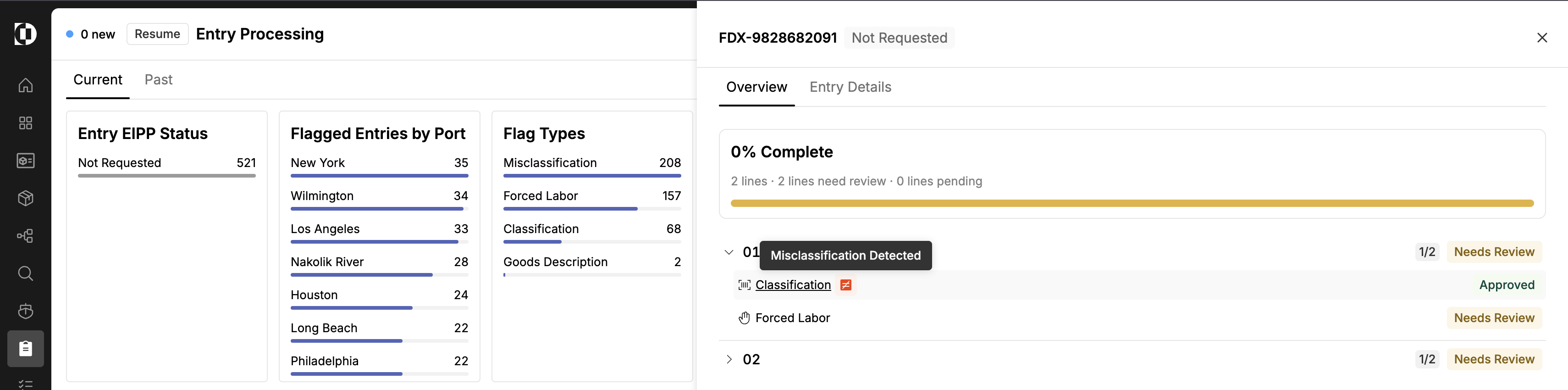
- In the entry side sheet and the Checks run column of the entries table, the separate Classification, Misclassification, and Vague Description rows are now folded into one Classification check. Misclassification risk and vague goods description appear as informational signal tags on that row rather than as their own checks.
- The signals flag a line for your attention but do not change the Classification check's status or the Needs review count, and they do not count toward the checks-run tally on the entry — so a line whose classification is clear still reads as approved, with the signal shown alongside it.
- Opening the folded Classification check takes you to the same classification detail as before, where the misclassification and vague-description workflows live.
- The fold changes the check display only — the filter blocks on the Entries home view still break out misclassification and vague goods description as their own filters, so you can scope the entries table to just the entries carrying one of those issues.
Navigation and terminology
- The tab that lists entries in progress, previously Entry Processing, is now called Current — shown alongside Past.
- The entry screening flag previously labeled Transshipment is now Misdeclared Origin.
Exports
- You can now export an entry to CSV from the entry actions dropdown.