
Entry Duty Calculator
The entry duty calculator estimates the landed duty for a single import entry by combining base tariff rates, preferential program rates, trade remedies, country-specific safeguards, and material-driven penalties. It is designed for importers of record and licensed customs brokers who need a defensible duty estimate before filing an entry or quoting a customer.
The entry duty calculator is in Beta.
When to use the entry duty calculator
- Importers of record pricing a forthcoming shipment, deciding whether to claim a preferential program, or sizing the cash impact of a new Section 232, Section 301, IEEPA, reciprocal, or Section 122 measure before goods arrive.
- Licensed customs brokers and trade consultants validating a duty estimate for a customer, comparing two countries of origin head-to-head, or sanity-checking a stacked entry that touches multiple trade remedies at once.
- Sourcing and supply teams comparing landed cost across alternate origins (China vs. Mexico, EU vs. Canada) before placing a purchase order.
- Compliance reviewers reconstructing the duty position on a historical entry to verify what should have been paid on a given entry date, or to evaluate a refund opportunity under a suspended or terminated program.
Before you start
To get an accurate result you need the following on hand. Missing items will either block the calculation or push the calculator into a worst-case assumption.
- HS code. The full 10-digit HTS code for United States entries, or a 6-or-more digit code for the EU, Canada, Mexico, and other destinations. The calculator accepts the code with or without periods.
- Country of import (destination). The country where the goods will be entered. The calculator supports the United States, all 27 EU member states (plus French overseas territories, Monaco, and Liechtenstein via customs-union aliasing), Canada, Mexico, and an expanding list of other destinations.
- Country of origin. The ISO country of origin under the destination's rules of origin.
- Entry value in USD. The dutiable value of the shipment. Ad valorem duties are calculated as a percentage of this value.
- Quantity (when applicable). Some HS codes carry per-unit duties (for example, a fixed amount per piece or per kilogram). When the underlying tariff is per-unit, the calculator will require quantity in the appropriate unit before it can return a total.
- Entry date. The date the goods enter the destination country. Tariff rates, safeguards, exclusions, and program effective dates are all evaluated against this date.
- Loading date. The date the goods were loaded on the mother vessel. Several in-transit exemptions depend on whether the loading date precedes a program's effective date.
- Material composition (for goods subject to material-driven duties). For products that fall under Section 232 steel, aluminum, copper, or the April 2026 Annex regime, you should be ready to provide the materials, their percentage composition, and where each material was smelted, cast, melted, or poured.
- Preferential program eligibility (if you intend to claim one). USMCA, DR-CAFTA, CETA, CPTPP, EFTA, GSP, PEM, and similar program claims must be supported by valid origin documentation.
How it works
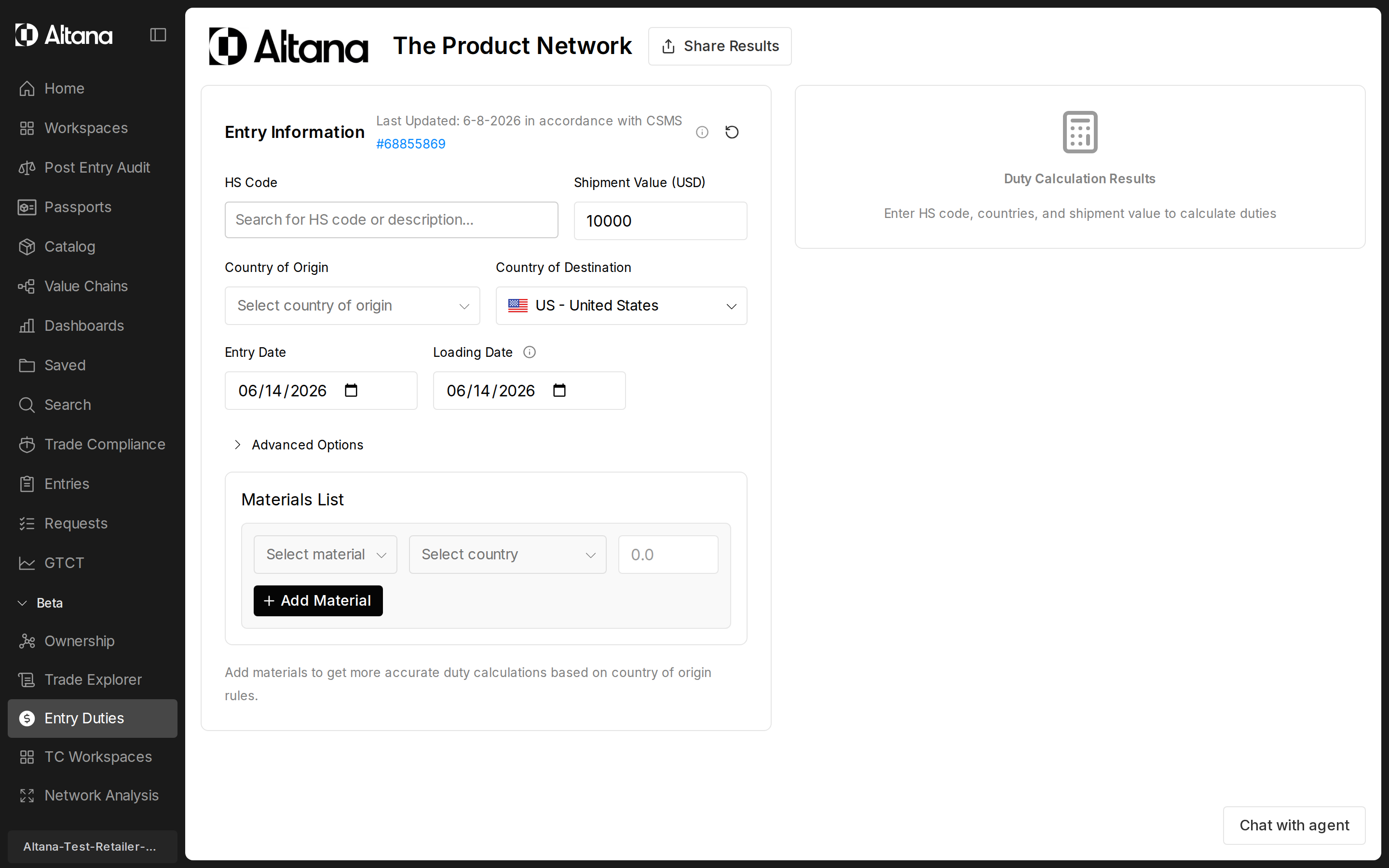
- Enter the HS code, entry value, country of origin, country of import, and entry date.
- Provide quantity if the calculator requests it for a per-unit tariff.
- Declare a preferential tariff program, material composition, or other inputs that affect the duty outcome; these appear on the form when they apply to your entry.
- Complete any country- or regime-specific sections that appear (for example, Automotive Use for United States entries, CBAM for EU entries that fall in CBAM scope, Cuota Compensatoria for Mexico entries with company-specific anti-dumping rates).
- Toggle any potential exclusion codes you can substantiate. The calculator surfaces what is potentially claimable based on your inputs; you decide what to claim.
- Review the duty rate summary, the line-item breakdown, and the country comparison grid. Iterate by changing inputs to model alternate origins, dates, or program claims.
Supported destinations
The calculator supports 96 destination countries. Every supported destination returns a duty calculation against that country's tariff schedule, preferential programs, and applicable safeguards. Some destinations also surface country-specific input sections in the UI (for example, US Section 232, EU CBAM, Mexico cuota compensatoria); see the per-country list below for which destinations have a dedicated country strategy.
Dedicated country strategies (36 destinations)
These destinations have their own calculator implementations and surface country-specific UI sections for the programs that apply there.
| Destination | ISO codes | Notes |
|---|---|---|
| United States | US | Full HTSUS coverage including Section 232, Section 301, IEEPA, reciprocal, Section 122, Chapter 99 exclusions, Civil Aircraft, Automotive, Semiconductor regimes. |
| Canada | CA | Customs Tariff schedules including USMCA, CETA, CPTPP, GSP, MFN; defaults to MFN when no FTA is requested. |
| Mexico | MX | Tarifa de la Ley including USMCA and cuota compensatoria company-specific anti-dumping rates. |
| European Union — 27 member states | AT, BE, BG, HR, CY, CZ, DK, EE, FI, FR, DE, GR, HU, IE, IT, LV, LT, LU, MT, NL, PL, PT, RO, SK, SI, ES, SE | EU common external tariff via TARIC; includes EU FTAs, PEM cumulation, CBAM, EU TARIC additional codes, EU MIP/specific-rate AD. |
| EU territories and microstates | GF (French Guiana), GP (Guadeloupe), MQ (Martinique), YT (Mayotte), RE (Réunion), MC (Monaco) | Resolve to the EU common external tariff. |
Generic country strategy (60 destinations)
These destinations are calculated through a generic country strategy with per-country configuration covering each country's base tariff schedule, preferential programs, and applicable safeguards.
Europe (non-EU) and EFTA
CH (Switzerland), LI (Liechtenstein — routes to Swiss schedules under the CH–LI customs union), NO, IS, GB (United Kingdom), TR (Türkiye), RS, ME, MD, AD, GI.
Asia-Pacific
JP, KR, CN, TW, HK, MO, SG, MY, TH, ID, PH, VN, KH, BD, LK, MV, NP, AF, AU, NZ, FJ, IN.
Middle East and Africa
IL, JO, EG, DZ, MA, TN, MU, ZW, MG, ZM.
Americas (other than the United States, Canada, and Mexico)
AR, BR, CO, EC, CR, CL, PE, BO, UY, PY, VE, PA, DO, CU, BS, AI, KY, BM.
Customs union groupings
Several customs unions are configured at the union level and resolve to their member states when you pick a member country: the Gulf Cooperation Council (GCC), the Southern African Customs Union (SACU), the Eurasian Economic Union (EAEU), the East African Community (EAC), the Central American Common Market (CACM), the Caribbean Community (CARICOM), and the Western Balkans grouping. Picking a member country routes the calculation through the union-level configuration.
Top-level inputs
These fields appear on the main form for every entry. They drive the core calculation and gate which regime-specific sections appear below.
HS Code
The Harmonized System classification of the product. Accepts 10 digits for United States entries and 6 or more digits for other destinations. Periods are optional. The picker supports text, stem, and semantic search, so you can paste a description and pick the matching code. The calculator warns you when an entered code has validity concerns for the chosen entry date, and it blocks the calculation when an HS10 requires a secondary HS10 the calculator cannot supply. Chapter 98 codes are not supported. Historical HS codes are supported when they were valid on the chosen entry date.
Country of Import
The import country. Defaults to US. Switching destination routes the request to a country-specific calculation strategy, swaps in the right base tariff schedule, and changes which sections render below. Switching destination also clears the HS code and any advanced inputs that are not portable across regimes. EU member states, French overseas territories, and Monaco resolve to the EU common external tariff. Liechtenstein routes to the Swiss tariff schedules under the CH–LI customs union. See Supported destinations for the full list.
Country of Origin
The ISO country where the goods were produced under the destination's rules of origin. Origin drives FTA eligibility, country-specific reciprocal tariffs, IEEPA scope, Section 232 melt/pour and smelt/cast checks, and AD/CVD exposure. Changing the country of origin triggers a full recalculation.
Shipment Value (USD)
The dutiable entry value, in USD. Ad valorem duties are computed as a percentage of this value. Native-currency entry for non-US destinations is on the roadmap; for now, convert to USD before entering.
Quantity
The unit count for products subject to per-unit duties. This field appears only when the duty in scope is per-unit (for example, a fixed amount per piece, per kilogram, or per pair) and is required when shown. The unit label changes to match the tariff's unit of measure. Per-unit rates preserve their full numeric precision; the calculator does not round to whole units.
Entry Date
The date the goods enter the destination. Range: 2020-01-01 through 2100-12-31. Defaults to today. Tariff rates, program effective dates, safeguards, exclusions, and historical HS validity are all evaluated against this date. Move the entry date to model a refund scenario on a terminated program, or to reconstruct a past entry.
Loading Date
The date the goods were loaded on the mother vessel. Defaults to the entry date and auto-syncs until you edit it manually. Required by some in-transit exemptions and by certain country-specific safeguards. For a long voyage where the loading date materially precedes the entry date, set it explicitly so the in-transit checks can fire.
IEEPA Status Toggle
Appears only when the primary calculation contains IEEPA tariffs. Two positions: In Force shows the duty with IEEPA applied; Suspended shows the duty with IEEPA rates zeroed out. Use the toggle to compare the with- and without-IEEPA totals when you are evaluating a refund position or scoping the cash impact of a suspension. When IEEPA is not relevant to the entry, the toggle is shown but disabled.
Preferential Tariff Program (SPI)
Shown on the form when a preferential program may apply to your entry. The dropdown lists only the programs the calculator believes are available for your HS code, origin, and destination combination (USMCA, DR-CAFTA, CETA, CPTPP, EFTA, GSP, PEM, and others as applicable). Claiming a program applies its preferential rate (often 0%) in place of the MFN base. Some claims unlock further inputs — for example, claiming an EU FTA enables the Origin Proof Type section, and claiming a PEM-zone program enables PEM diagonal cumulation. You are responsible for verifying that the goods meet the program's rules of origin; the calculator does not verify origin content for you.
Materials Grid
A table of rows where you declare what the product is made of and where each material was sourced or processed. Each row carries:
- Material — autocomplete (Aluminum, Steel, Copper, and others).
- Country — the ISO country for that material. If you leave it as UNKNOWN, the calculator applies the worst-case origin for any penalty in scope.
- Composition % — the percentage of the product by weight or value, depending on the regime. 0% values are accepted. The total across rows must sum to 100% or less.
- Processing details — for aluminum, the primary, secondary, and cast countries; for steel, the melt and pour countries; for copper, the smelt and cast countries. These drive Section 232 outcomes.
When a material composition is required but not supplied, the calculator defaults to the worst-case 100% composition rather than skipping the penalty. For Annex 2026 entries, the calculator may auto-add aluminum, copper, and Annex I-B derivative materials so you do not have to enter them manually; auto-added rows are flagged so you can tell them apart from rows you entered.
Country- and regime-specific sections
The following sections render only when the destination and the underlying tariff data say they are in scope. Each section maps to a specific regulatory regime.
Automotive Use (United States Section 232)
When it appears: destination is the United States.
Field: Automotive Use — Unspecified, Non-Automotive Use, Automotive Use, or MHDVP (Medium and Heavy Duty Vehicle Parts).
Regime: United States Section 232 automotive program. When set to Unspecified, the calculator infers automotive use from the HS code within the Section 232 Auto effective dates. A positive automotive classification applies the Section 232 auto rate and suppresses overlapping aluminum and Annex 2026 metals penalties on the same line. When a non-automotive product falls in the same HS range, the calculator surfaces the Section 232 Auto exclusion code (9903.94.02, 9903.94.03, or 9903.94.06) so you can claim non-automotive treatment. Automotive Use and Civil Aircraft Use auto-inference are mutually exclusive.
Semiconductors and Logic Integrated Circuits (United States Section 232)
When it appears: destination is the United States and the HS code is in scope for the Section 232 semiconductor program.
Fields:
- Is/Contains S232 Logic Integrated Circuit — Unspecified (infer from HS code), Yes, or No. Selecting No emits exclusion code 9903.79.02.
- S232 Logic Integrated Circuit Usage — claim a use-based exemption (U.S. Data Center over 100 MW AI load, U.S. R&D, U.S. Startup/Early-Stage, U.S. Consumer Apps, U.S. Civil/Industrial, U.S. Public Sector, U.S. Repairs/Replacement, Other/No Exclusion).
Regime: United States Section 232 semiconductor and logic IC program. Each declared use maps to a specific exclusion code on the output. When this regime is active, the calculator suppresses overlapping aluminum penalties on the same line and the automotive exclusion code 9903.94.06.
Civil Aircraft
When it appears: destination is the United States.
Field: Civil Aircraft Use — Unspecified, Non-Civil Aircraft Use, or Civil Aircraft Use. Auto-inference fires only for Chapter 88 HS codes.
Regime: Civil aircraft exemption. Civil aircraft products surface the appropriate exemption code (9903.02.76 for many regimes, 9903.96.01 for GB origin after the GB effective date, the Switzerland-specific code, and so on). The calculator zeroes the 200% Russia aluminum penalty when motorcycle exclusion 9903.82.13 applies, and applies the civil aircraft exemption to EU derivative steel penalties when in scope.
Additional Potential Codes (United States Chapter 99)
When it appears: destination is the United States and the backend lists non-empty potential exclusion codes for the entry.
Field: a set of chips, one per potential Chapter 99 code. Each chip shows the code, a description, the tariff it applies against, and a requirement hint.
Regime: United States Chapter 99 user-declarable exclusions (US content of 20% or more, donation, humanitarian, in-transit, and similar). You toggle on the codes you can substantiate; the calculator includes the code on the output and adjusts the duty accordingly. Section 301 exclusions and Section 122 exclusion codes are surfaced here as well so you can claim them.
TARIC Additional Code (EU)
When it appears: destination is in the EU.
Fields: a free-text input for the additional code (for example, A001) and a chip picker that lists potential codes returned by the backend, with the producer name, the ad valorem rate, the code kind, and notes.
Regime: EU TARIC additional codes for company-specific AD/CVD rates. Without a claim, the residual (highest) rate applies. Claiming the correct company-specific code unlocks that producer's individual or cooperating rate, which is often substantially lower than the residual.
Origin Proof Type (EU)
When it appears: destination is in the EU and a preferential program is selected.
Field: Origin Proof Type — Unspecified, REX Statement on Origin, Importer's Knowledge, EUR.1 Movement Certificate, EUR-MED (PEM Cumulation), or Form A (GSP).
Regime: EU FTA and preferential origin documentation. Informational in Beta — the field records what proof is held and unlocks PEM diagonal cumulation when EUR-MED is selected.
PEM Diagonal Cumulation (EU)
When it appears: destination is in the EU and either a PEM-zone preferential program is selected or Origin Proof Type is set to EUR-MED.
Fields:
- Claim PEM Cumulation — Yes or No.
- Cumulation Origin Countries — comma-separated ISO-2 codes of the PEM partner countries where qualifying materials or processing occurred.
Regime: EU Pan-Euro-Mediterranean diagonal cumulation. When claimed, processing in listed partner countries counts toward EU origin under the program's rules of origin. The field is informational in Beta — the calculator does not validate that the listed countries actually qualify.
Import Unit Price (EU)
When it appears: destination is in the EU and the HS code is subject to a Minimum Import Price measure or a specific-rate anti-dumping measure (euros per kilogram, per unit, and so on).
Field: Import Unit Price in EUR.
Regime: EU MIP and specific-rate AD measures. For MIP measures, the AD duty is waived when the declared unit price is at or above the minimum; below it, the AD duty is the gap. For specific-rate AD, the duty is the rate times the quantity. The calculator surfaces a flag when an MIP measure applies but no price has been provided.
CBAM Declaration (EU)
When it appears: destination is in the EU and the HS code falls within a CBAM sector (cement, electricity, fertilizer, iron and steel, aluminum, hydrogen).
Fields:
- Verified Embedded Emissions (tCO₂e / tonne) — verified, declared embedded emissions per tonne of product. Leave blank to use the EU default values for the sector, which carry a higher surcharge.
- Origin Carbon Price Paid (EUR / tCO₂e) — any carbon price already paid in the country of origin. Deducted from the CBAM levy.
- Authorized CBAM Declarant ID — the importer's CBAM Authorized Declarant registration ID. Informational in Beta; required from January 2026 onward.
Regime: EU Carbon Border Adjustment Mechanism. The CBAM levy is calculated in parallel to the tariff and reported in a separate field on the result — it is not added to the tariff stack.
Cuota Compensatoria (Mexico)
When it appears: destination is Mexico and the backend returns non-empty potential cuota rates for the entry.
Field: a chip picker, one chip per potential cuota company. Each chip shows the producer name, the ad valorem rate, and any per-unit rate. A DEFAULT chip represents the residual rate.
Regime: Mexico cuota compensatoria (AD/CVD). Claiming a named producer applies that producer's company-specific rate, which is often materially lower than the residual.
Outputs and interpretation
Duty rate summary
At the top of the result, the calculator reports the effective ad valorem rate, any per-unit rate, the combined ad-valorem-equivalent rate (per-unit converted into an ad valorem percentage at the entered value and quantity), and the total duty amount in USD. Use the ad-valorem-equivalent figure to compare entries across origins and HS codes on a like-for-like basis.
Information card
The information card surfaces regulatory flags for the entry: antidumping or countervailing duties in scope, quota status, "complicated tariff" or "requires review" markers, and any prohibition flag. When quota status is shown with an unknown flag, the calculator cannot see real-time quota balance — confirm with the destination customs authority before filing.
Materials grid (output)
The output side of the materials grid mirrors what you entered, plus any material rows the calculator auto-added (for example, aluminum, copper, and Annex I-B derivative materials for Annex 2026 entries). Auto-added rows are flagged. Per-row duty contributions are shown so you can see which material is driving the penalty.
Line items
The line-item breakdown lists every duty that stacks into the total, in CBP ACE sort order on the United States printable summary. Each line shows the program (MFN, FTA, Section 232 component, Section 301, IEEPA, reciprocal, Section 122, AD/CVD, safeguard, retaliation, CBAM, MIP, cuota compensatoria, and so on), the rate, the basis, the applicable Chapter 99 codes (with their USITC display names), and any exclusion codes the calculator emitted. Penalty lines now surface the exclusion codes you could potentially claim against them.
Country comparison grid
The comparison grid lets you compare the same entry across multiple countries of origin without leaving the page. The grid is pre-populated with the top five United States trading partners (CN, CA, MX, JP, DE) and you can add custom countries. Columns:
| Column | What it shows |
|---|---|
| Country of Origin | ISO country with flag. |
| Tariff Rate | The effective ad valorem rate. Per-unit rates are shown separately; a combined ad-valorem-equivalent rate is shown when both apply. |
| Duty Amount | Total calculated duty in USD for that origin at your entered value and quantity. |
| FTA Status | The preferential program in effect (for example, USMCA at 0%). Shows the base rate when no FTA applies. |
| Safeguards / Penalties | Additional duties from safeguards, Russia aluminum, Section 301, Section 122, and similar — already summed into the total duty column. |
| USMCA Variant (Mexico and Canada only) | For Mexico or Canada origin, a duplicate row shows the USMCA-claim outcome side by side with the non-USMCA outcome. |
Interpretation guidance
Some outputs are deterministic — for a given HS code, origin, destination, and entry date, the calculator returns the same base rate, the same set of applicable penalties under the destination's stacking rules, the same weighted average across materials, and the same Chapter 99 code extractions. Other outputs depend on what you tell the calculator and what you can substantiate.
- Automotive classification. When Automotive Use is left as Unspecified for a United States entry, the calculator infers it from the HS code within the program's effective dates. If the inference is wrong for your shipment, set the field explicitly.
- Composition-weighted totals. The calculator cannot infer a product's material composition from the HS code. Provide the material names and composition percentages yourself, or accept the worst-case 100% default.
- Material processing details. Smelting, casting, melting, and pouring countries must be supplied (or left as UNKNOWN, in which case the calculator applies the conservative rule — for example, treating an unknown aluminum processing country as Russia for Annex 2026, which produces the high duty).
- Exclusion applicability. Chapter 99 exclusions are surfaced to you as potential. You must affirmatively declare that you meet the conditions and claim the code on the entry; the calculator does not apply them automatically.
- Quota status. EU steel TRQ and other quotas are reported with an unknown-status flag. The calculator does not see real-time quota balance. Confirm with the destination customs authority before finalizing.
- Company-specific rates. EU TARIC additional codes and Mexico cuota company rates are surfaced as options. You pick the one that matches your producer.
- Effective duty amount in USD. Calculated only when entry value is provided. A rate alone is not enough to compute the total.
- Civil aircraft, pharmaceutical, and similar use claims are not encoded in the HS code and require an explicit user input where the section is shown.
Result statuses you may see:
- MISSING_VALUE — a required input is incomplete (HS code, date, destination, or a per-unit quantity).
- REQUIRES_REVIEW — the tariff is too complex for an automated calculation. Consult trade counsel.
- PROHIBITED — the product cannot be imported at the chosen origin and date.
- SUGGESTION — a calculation completed, but you should verify material compositions and processing sourcing before relying on the number.
Constraints and caveats
- The calculator does not verify origin or rules of origin. It checks that an HS code is eligible for a preferential program and applies the program's rate, but it does not validate that the goods meet the program's substantive RoO. That remains your responsibility.
- It does not see real-time quota balances. Quota-driven outcomes are reported with both in-quota and out-of-quota rates and an unknown-status flag.
- It cannot infer material composition from the HS code. Provide composition explicitly, or accept the worst-case default.
- It cannot determine which Chapter 99 exclusion you qualify for. Eligible codes are surfaced as potential; you declare them.
- Currency. Entry value is captured in USD. Native-currency entry for non-US destinations is on the roadmap.
- HS chapter coverage. Chapter 98 codes are not supported. HS10 codes that require a secondary HS10 are blocked from calculation.
- Destination coverage. 96 destinations are supported. See Supported destinations for the full list.
- Beta. The calculator is in Beta. Several inputs are informational only in this release (EU Origin Proof Type, PEM cumulation country validation, CBAM Authorized Declarant ID for entries before January 2026). The Beta marker on this page reflects that surface; the calculation engine itself is in active use.
Related
- Entry Duty Calculator Changelog — chronological record of program coverage, rate corrections, and new destination support.