
Products & the Catalog
Your system of record for the products you trade — and the foundation every other Altana workflow reads from and writes back to.
The catalog is your authoritative record on Altana for the products you make, source, and trade — along with the suppliers, facilities, and supply-chain relationships that produce them. Every product, supplier, and tariff attribute that other Altana solutions act on reads from and writes back to the catalog. Classify once in the catalog; the result flows into your value chain views, your trade compliance workspaces, your Product Passports, and your exposure reviews.
A product as a first-class entity
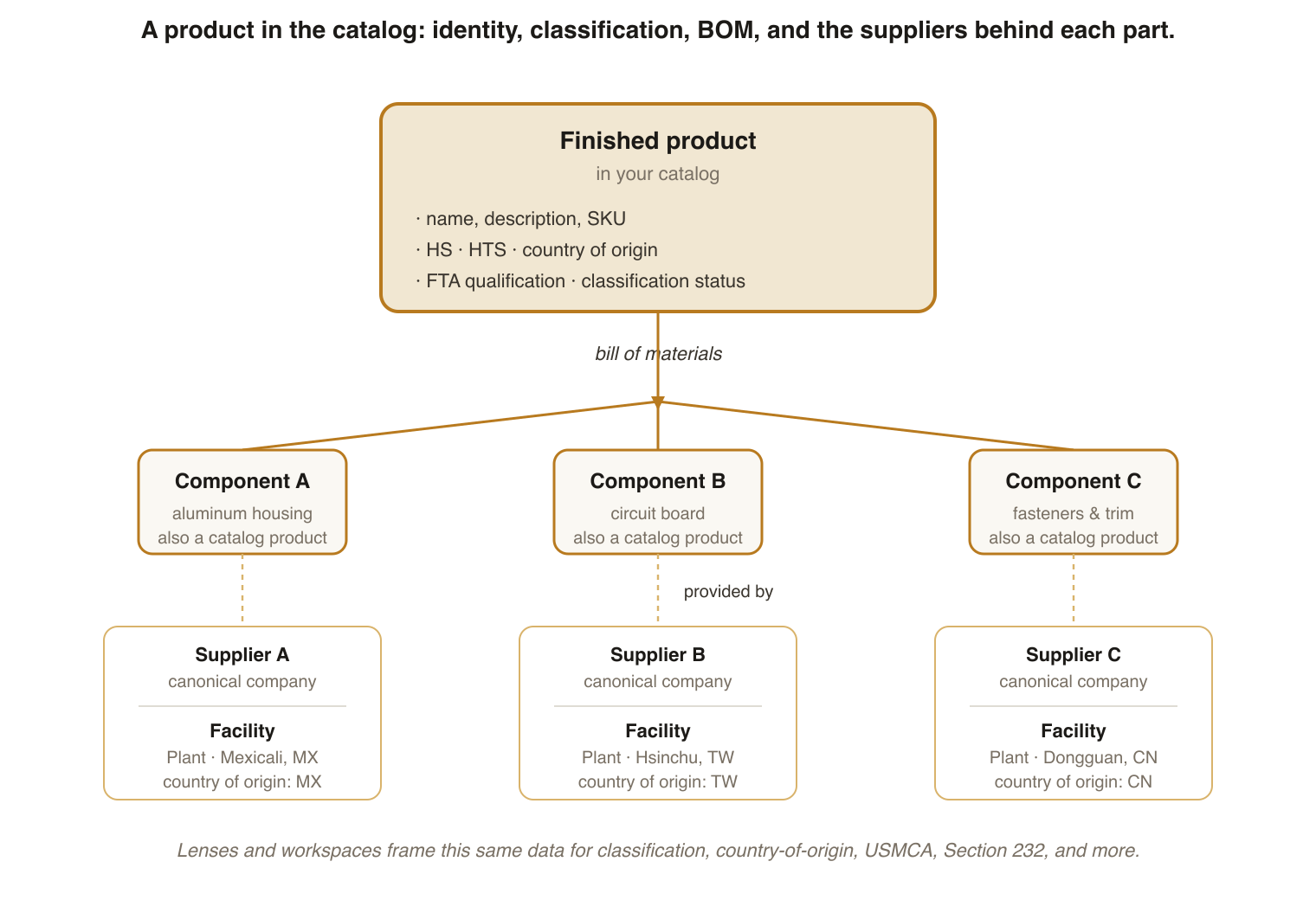
A product in the catalog is a good you make, source, or trade. Each product carries three layers of information:
- Identity — the product's name, description, internal SKU or external identifier.
- Classification attributes — HS code, country of origin, FTA qualification, and the other trade-domain values that drive duties and screening.
- Network links — the suppliers and facilities that provide the product, and the upstream value-chain relationships behind them.
Altana marks observed values (an HS code you set or an SKU you provided) and inferred values (a country-of-origin suggestion or an aggregate sourcing estimate) distinctly. See How Altana Infers for how the provenance is captured and surfaced.
Bills of materials
The bill of materials (BOM) lists the components, sub-assemblies, and raw materials that go into a finished product. When you upload a BOM, the catalog links each component to its own product record and, where Altana can resolve it, to the supplier and facility that produced it. Downstream tools then have what they need to trace material flow: country-of-origin determinations, USMCA qualification, Section 232 melt-and-pour evaluations, and multi-tier value-chain maps all read from the BOM.
Lenses and workspaces
The catalog holds everything; lenses and workspaces are how you focus on a specific task.
A lens is a configurable view of catalog data — a combination of charts, filters, columns, and highlights that frames products for a specific workflow. The classification lens shows what is unclassified and what is in review. The country-of-origin lens surfaces products where the origin is uncertain or worth a second look. You can build your own lenses for the patterns your team works on.
A workspace is the workflow surface that reads products from the catalog and applies lenses for a specific task — Trade Compliance, GTM, Country of Origin, Section 232, USMCA. Edits made in a workspace propagate back to the catalog, so the catalog stays the system of record while your team works in the view that fits the job.
Extending the catalog
A custom field is an attribute you define to extend a catalog entity beyond the standard schema — an internal SKU group, a program code, a sourcing category. An administrator configures the field, and it shows up in lenses alongside the built-in attributes.
A classification status tracks where a product's classifications stand — whether an HS code has been suggested by Altana, accepted by a user, or is pending review. Downstream tools use status to decide whether to treat a classification as authoritative; status also drives the work queues in classification lenses.
How you'll see this in Altana
- Creating a Workspace walks through opening a workspace against the catalog for a specific task.
- Applying lenses and Creating custom lenses show how to switch the view onto the same catalog data.
- Risk exposure assessments run against the catalog to surface which products and suppliers carry exposure.
- For exact field-level details of catalog data — column types, identifiers, formats — see the Catalog Glossary (data dictionary).
Key terms
- Catalog
- Your system of record on Altana for the products you make, source, and trade, along with the suppliers, facilities, and supply-chain relationships behind them. Every other Altana solution reads from and writes back to it.
- Product
- A good you make, source, or trade. In the catalog each product carries identity (name, description, SKU), classification attributes (HS, country of origin, FTA qualification), and links to the suppliers and facilities that provide it.
- Bill of materials (BOM)
- The components, sub-assemblies, and raw materials that go into a finished product. Upload a BOM to link input products to a finished product so downstream tools can trace material flow.
- Lens
- A configurable view of catalog data — charts, filters, columns, and highlights — that frames products for a specific workflow such as classification, country of origin, duty review, or exposure.
- Workspace
- The workflow surface that reads products from the catalog and applies lenses for a specific task. Edits propagate back to the catalog.
- Custom field
- An attribute you define to extend a catalog entity beyond the standard schema. Configured by an administrator and surfaced in lenses alongside built-in attributes.
- Classification status
- The state of a product's classifications in the catalog — suggested by Altana, accepted by a user, or pending review. Determines whether downstream tools treat the classification as authoritative.