
Trade Reference Explorer
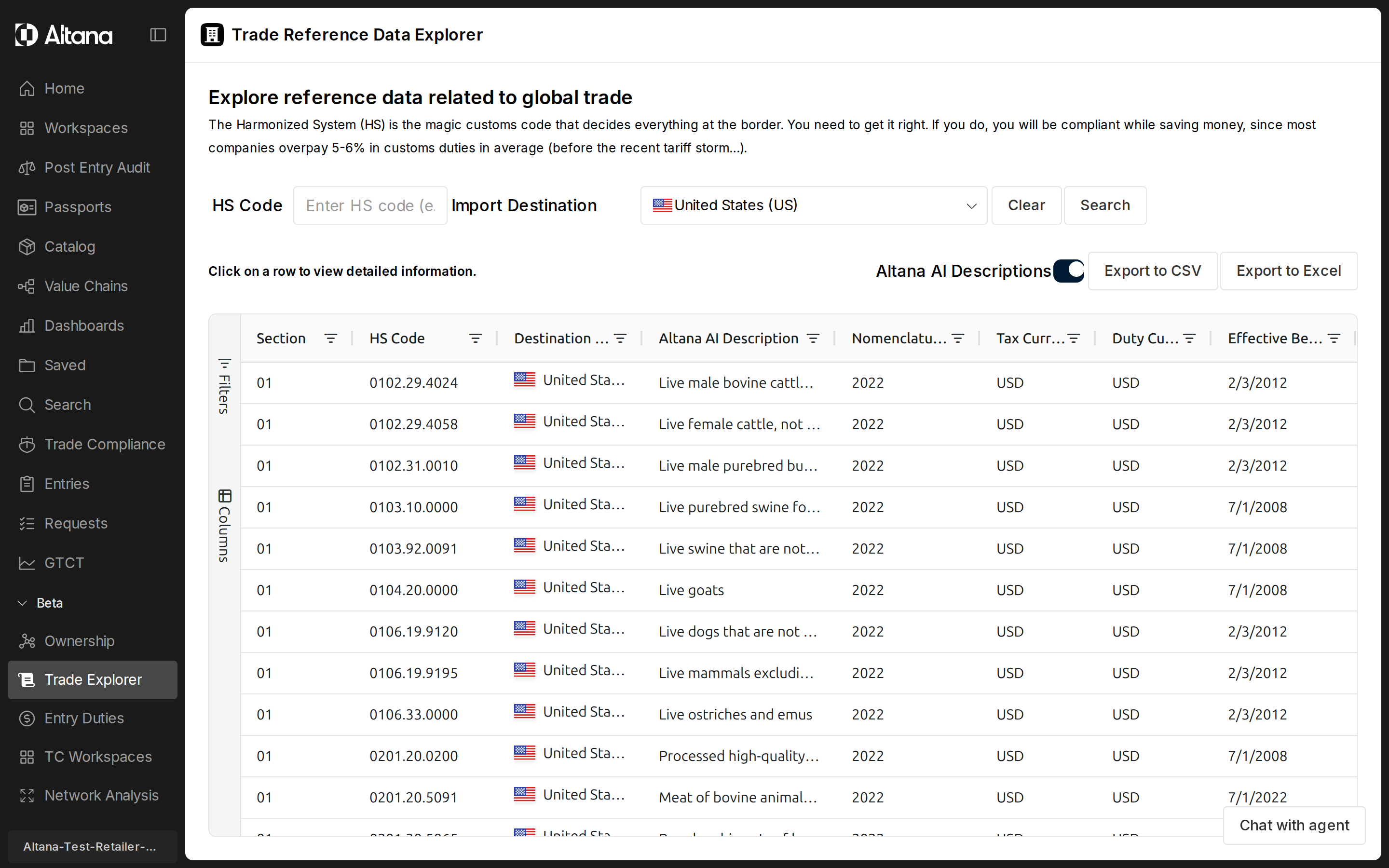
The trade reference explorer is a Beta workspace for looking up HS code definitions, duty rates, and regulatory requirements against a destination country. Use it when you need to confirm how a product is classified, what duties apply for a given origin-destination pair, and which agency requirements travel with that classification.
Status: Beta. Coverage and behavior continue to expand. See Trade Reference Explorer Changelog for the current state.
When to use the trade reference explorer
- Importers verifying that an HS code is current, looking up the applicable duty rate against a specific origin, and checking whether preferential programs such as USMCA apply.
- Customs brokers preparing entries who need to confirm classification, agency requirements (PGA), anti-dumping or countervailing flags, and quota indicators before filing.
- Trade analysts comparing duty exposure across destination countries or nomenclature years for the same product.
- Sourcing and procurement teams evaluating total landed cost by varying the country of origin against a fixed destination.
- Compliance and enforcement researchers tracing which regulatory programs and agencies attach to a given HS code in a given jurisdiction.
Before you start
You will typically have on hand:
- An HS code (6-digit or 10-digit) or a product description you can use to find one.
- The destination country where the goods will be imported.
- The country of origin (optional for HS lookup, required to see duty information).
- An optional nomenclature year if you are working against a historical version of the HS schedule rather than the current one.
How it works
- Enter an HS code or filter by chapter, heading, or nomenclature year. The data grid loads matching HS code records for the selected destination country.
- Click a row in the grid to open the sidebar. The sidebar shows the classification hierarchy, descriptions, and the tab strip for duty and regulatory views.
- Switch to the Duties tab and select an origin country to see applicable tariff rates and preferential program eligibility.
- Switch to the Regulations tab to see partner government agency requirements, anti-dumping and countervailing flags, quota indicators, and reporting obligations for the destination.
- Use the Export to CSV or Export to Excel buttons to download the current grid view for downstream use.
Filters
HS Code
Free-text input that filters the grid by HS code. Accepts the code with or without periods. Partial entries match by prefix, so typing a 4-digit heading returns every code under it. Default is empty. Changing this value refreshes the grid to the matching set.
Import Destination
Dropdown of supported destination countries, shown with flag icons. Default is US. Selecting a new destination refreshes the grid against that country's tariff schedule and regulatory dataset. Selecting any removes the country restriction. Only destinations with a configured duty calculation are selectable; using origins outside this list is still supported for reference lookups.
Nomenclature Year
Set filter on the grid column listing available HS nomenclature years (for example, 2022, 2023, 2024). Default is empty, which returns the current nomenclature. Changing the year refreshes the grid to the HS code definitions in effect for that nomenclature.
Origin Country (Duties tab only)
Dropdown that lets you select the country of origin for the goods. Visible only inside the Duties tab in the sidebar. Default is empty. The destination country is excluded from the selectable list. Setting an origin triggers the duty and free-trade-agreement lookup for that origin-destination pair; clearing it hides the duty cards.
Altana AI Descriptions
Toggle switch. Default is on. When on, the description column and sidebar show the Altana-summarized description, which is a concise rewrite of the statutory text. When off, the column and sidebar show the full statutory description from the published HS schedule.
Clear
Resets the HS code input, sets destination back to US, clears the nomenclature year filter, closes any open sidebar, and clears any per-column grid filters.
Search
Forces a fresh grid load using the current filter values. Use this if you want to bypass cached results and re-query from scratch.
Export to CSV / Export to Excel
Downloads the current grid view as hscode-data-YYYY-MM-DD.csv or hscode-data-YYYY-MM-DD.xlsx. The export includes the columns currently visible in the grid.
Tabs and views
HS Detail
The default tab. Shows the classification hierarchy and descriptions for the selected HS code against the destination country. Visible fields include the destination country, the full HS code, the chapter, heading, and subheading numbers and descriptions, the Altana-summarized description, the derived description, and the full statutory description.
Duties
Shows tariff rates and preferential program eligibility for the selected HS code, destination, and origin. You must select an origin country to populate this tab. Each duty card lists the rate type (for example, General, MFN, preferential under a named FTA), the ad valorem rate, the currency, the effective date range, and any program flags (such as USMCA, Section 232 automotive, or quota applicability). Multiple rate types render side by side so you can compare base, applied, and preferential rates.
Regulations
Shows regulatory requirements and trade restrictions for the HS code and destination. Records are grouped by attribute and include partner government agency assignments (PGA), anti-dumping flags (ADD_FLAG), countervailing duty flags (CVD_FLAG), AES reportability, Lacey Act applicability, quota indicators, and short descriptions. Each card shows the disposition (for example, REQUIRED or MAY_BE_REQUIRED), the agency code, program codes, effective dates, and the source dataset.
Data grid columns
| Column | What it shows |
|---|---|
| Section | HS section number (1-21). Used for hierarchical classification organization. |
| HS Code | Harmonized System code formatted as XXXX.XX.XXXX. Click the value to open the sidebar detail view. Filterable as a text column. |
| Destination Country | ISO 2-letter country code shown with a flag icon and the full country name. Filterable using the set of available destinations. |
| Altana AI Description / Full Description | Dynamic column that swaps content based on the Altana AI Descriptions toggle. Shows the concise Altana-summarized description when on, and the full statutory description when off. |
| Details | Hidden by default. Holds structured detail objects; displays "View details" when populated. |
| Other Details | Hidden by default. Holds additional structured detail; displays "View details" when populated. |
| Nomenclature Year | Year of the HS nomenclature used to define this code (for example, 2022 or 2023). Filterable using the available year list. |
| Tax Currency | Currency code applied to tax values for this destination (for example, USD or EUR). |
| Duty Currency | Currency code applied to duty values for this destination. |
| Effective Begin Date | Date when this HS code definition becomes effective. Filterable as a date column. |
HS detail sidebar
Header
Always visible. Shows the formatted HS code (XXXX.XX.XXXX) and the summarized or full description as a subtitle.
Country Information
Visible in the HS Detail tab. Shows the destination country with its flag and ISO code in a gray information box.
HS Code Details
Visible in the HS Detail tab. Lays out the full classification hierarchy: HS code, chapter (number and description), heading (number and description), and subheading (number and description) in a table.
Altana AI Description
Visible in the HS Detail tab when an Altana-summarized description is available for the code. Rendered in a blue highlight box so you can distinguish it from the statutory text.
Descriptions
Visible in the HS Detail tab when populated. Table view of the derived description and the full statutory description, so you can read both alongside the summary.
Country Selection (Duties tab)
Visible in the Duties tab. Shows the destination country as read-only with its flag, and an origin country selector. Until you pick an origin, the section displays a prompt to select one. Choosing an origin triggers the duty lookup.
Duty Information Cards
Visible in the Duties tab once an origin is selected. Each card represents one rate type or preferential program for the origin-destination-HS combination. Cards include the rate type, short name, ad valorem rate, and notes. Cards matching a currently highlighted agreement are visually emphasized.
Regulatory Requirements & Information
Visible in the Regulations tab when regulation data exists for the HS code and destination. Records are grouped by attribute (PGA, ADD_FLAG, CVD_FLAG, IS_AES_REPORTABLE, LACEY, QUOTA_INDICATOR, SHORT_DESCRIPTION). Each card shows a color-coded status, the disposition (REQUIRED or MAY_BE_REQUIRED), agency code, program codes, descriptions, effective dates, and source dataset.
Outputs and interpretation
- Tariff rates are deterministic. Base rates, applied rates, and negotiated preferential rates come from official published schedules. They reflect the rate that applies for the inputs you provide, not a prediction.
- Regulatory flags reflect published rules. Anti-dumping flags, countervailing duty flags, quota indicators, and partner government agency requirements come from authoritative regulatory sources and are filtered to the effective date. They describe rules that exist, not inferences about them.
- Effective dates matter. Both duty rates and regulatory records carry effective begin and end dates. The explorer shows the records in effect for your inputs; rows outside that date window will not appear.
- Altana-summarized descriptions are aids, not classifications. They make scanning faster, but they do not replace the statutory description for the purpose of classification decisions. Toggle the descriptions off to read the full statutory text before you commit to a code.
- Verify the code against your product. Similarly worded items can sit in different HS chapters. Use the chapter, heading, and subheading detail in the sidebar to confirm that the code matches your product's actual characteristics.
Constraints and caveats
- Beta. The trade reference explorer is in Beta. Coverage, layout, and behavior continue to change; see the changelog for the latest state.
- Destination coverage. The duty calculation supports a defined set of importing jurisdictions. Any country can be selected as an origin for reference, but duty results require a supported destination.
- HS code validity. Codes that are expired or not recognized for the selected nomenclature year are flagged in the workflow. Confirm validity before relying on a rate or regulation for entry preparation.
- Data freshness. Reference data is pulled from the current data warehouse and refreshed regularly. Results may be served from cache during the active session for responsiveness. If you want to force a fresh read, use the Search button.
- Browse vs. all-time queries. The browse grid shows primary current records per country. Historical HS code changes do not surface here; use duty queries against a specific as-of date when you need historical boundaries.
- Not legal advice. The explorer surfaces published reference data to support decisions. It is not a substitute for licensed customs brokerage or legal counsel on a specific shipment.