
Catalog Subscriptions
Availability: these features depend on your plan and user role. Contact your Altana account team if they're not visible in your environment.
You can subscribe an endpoint you control to a catalog and receive its product changes as they happen. When a product in the catalog is created, updated, or archived, Altana sends an event to your endpoint — so your own systems stay current without polling the API. This is a webhook-style integration: if you have built a webhook receiver before, the pattern will be familiar.
This page covers both sides: how to set up a subscription, and how to build an endpoint that receives its events correctly — the request your endpoint gets, the event shapes, the delivery guarantees, and request verification.
How it works
- You create a subscription on a catalog, pointing it at an HTTPS endpoint you control.
- Altana watches the catalog for committed changes and groups them into batches.
- Each batch is delivered as a single
POSTto your endpoint. Your endpoint acknowledges it by responding with a2xxstatus.
Events reflect committed catalog state. A change becomes eligible for delivery once it is durably saved, so your endpoint sees the same data a reader of the catalog would see.
A subscription watches a single catalog. To receive changes from more than one catalog, create a subscription for each; they deliver independently and can point at the same endpoint or different ones.
Set up a subscription
Configure subscriptions from Settings → Integrations → Catalog Subscriptions. The tab lists your existing subscriptions with their state and delivery health, and is where you create new ones.
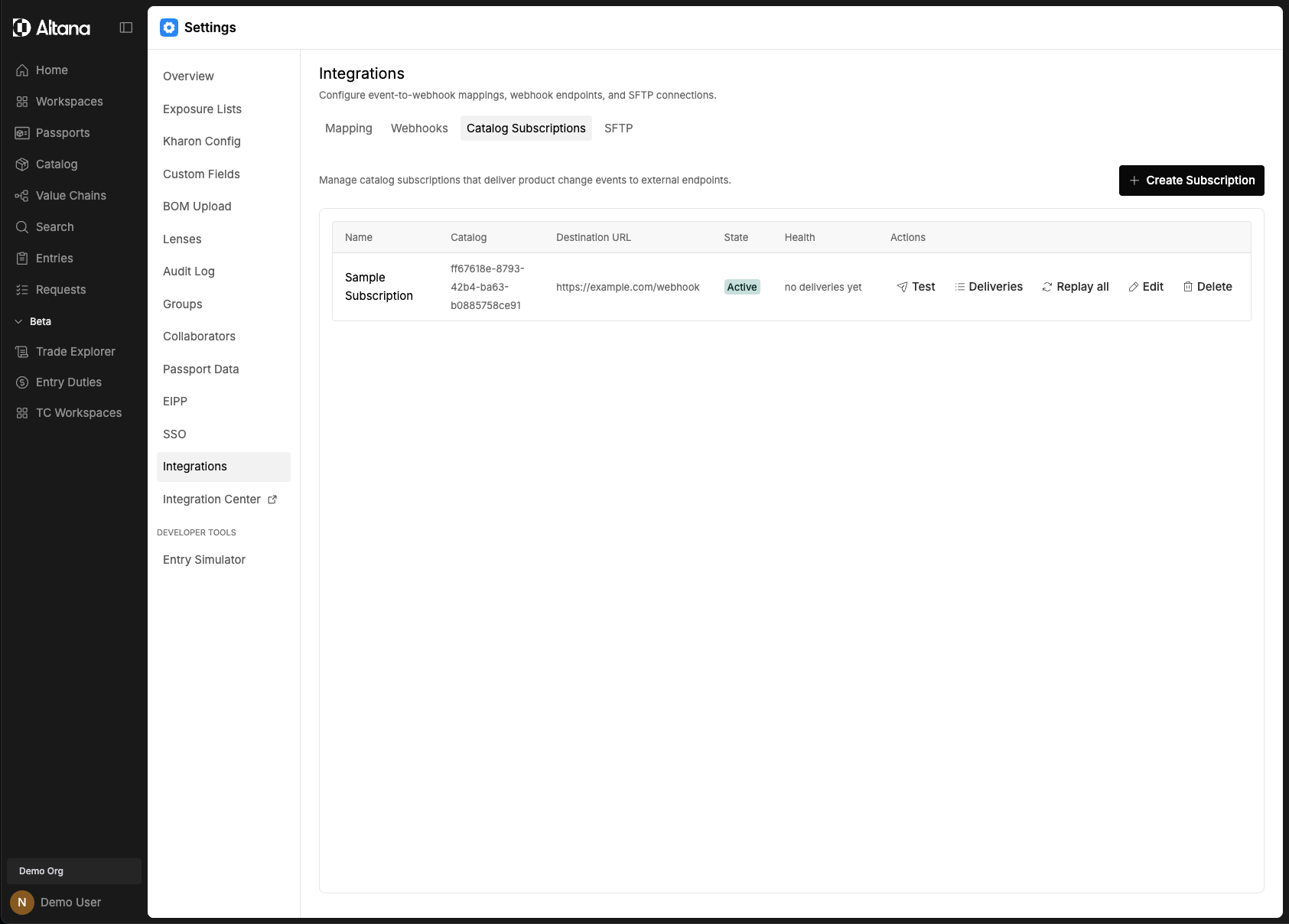
Create a subscription
- On the Catalog Subscriptions tab, select Create Subscription and choose the catalog to watch.
- Fill in the form:
- Name — a label to identify the subscription.
- Destination URL — the endpoint that receives the event batches. It must use
https://. - JWT Audience (optional) — the
audclaim Altana puts in the signed request token. Set it if your endpoint validates a specific audience; if left blank, it defaults to your destination URL's origin. - State — Active starts emitting events immediately; Paused creates the subscription without delivering yet (see the bootstrap note below).
- Max Events Per Batch — the most events Altana puts in a single
POST(default 100, up to 1,000). Lower it if your endpoint has a strict request-size limit; raise it to reduce per-request overhead for large catalogs.
- Select Validate to confirm Altana can reach the endpoint, then create the subscription.
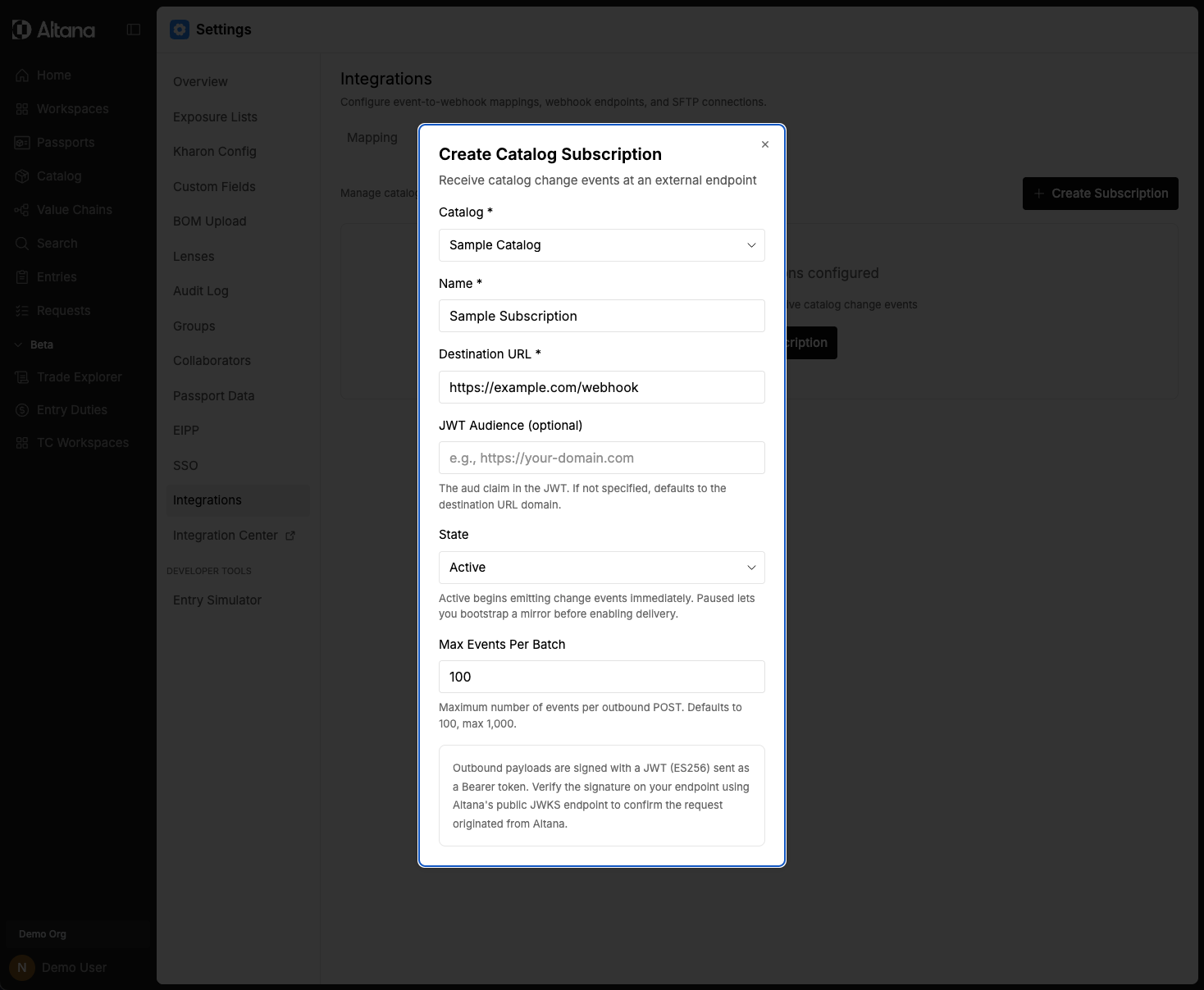
Bootstrap the full catalog
A subscription delivers changes as they happen. To also load the catalog's existing products into your endpoint — so you start from a complete mirror rather than only seeing products once they next change — use Replay all.
Open the subscription on the Catalog Subscriptions tab and select Replay all. Altana enqueues every current product in the catalog and drains them through the normal delivery pipeline; watch the deliveries panel as they flow to your endpoint. Replayed products arrive in the same batch and event format as ongoing changes, so your receiver needs no special handling — and because each carries a stable event_id and version_number, a product your endpoint has already seen is a safe no-op.
You can run Replay all again whenever you need to — for example, to re-seed a rebuilt downstream system or recover after extended endpoint downtime.
Test and manage
- Test sends a sample event of a type you choose to the endpoint, so you can confirm your receiver parses and acknowledges it before real traffic.
- View deliveries shows recent delivery attempts and their responses, and the health panel surfaces consecutive failures — use it to spot an endpoint that has started rejecting batches.
- Pause stops delivery without deleting the subscription; edit changes any field; delete removes it.
The request your endpoint receives
Each batch is an HTTPS POST with a JSON body. The body is an envelope that wraps an ordered list of events:
{
  "schema_version": 1,
  "batch_id": "0199c0de-...",
  "subscription_id": "0199c0de-...",
  "catalog_id": "019edf94-...",
  "events": [
    {
      "event_id": "evt_a1b2c3...",
      "event_type": "created",
      "occurred_at": "2026-06-19T12:15:04.812Z",
      "product": {
        "external_id": "SKU-10481",
        "version_number": 14
        /* ...the product's fields... */
      }
    }
  ]
}
The request carries these headers:
Content-Type: application/jsonAuthorization: Bearer <token>— a JWT signed by Altana that your endpoint should verify before trusting the body (see Verifying requests).X-Altana-Batch-Id— the samebatch_idas the body, for logging and correlation.
A batch holds up to the maximum number of events configured for the subscription. A catalog change that produces more events than that is split across several batches.
Event types
created— a product was added to the catalog.updated— an existing product changed.deleted— a product was archived (removed from the catalog).
Every event includes:
event_id— a stable, unique identifier for this event. Use it to deduplicate (see Delivery guarantees).event_type— one of the values above.occurred_at— when the change happened, as an ISO 8601 timestamp.product— the affected product. Forcreatedandupdatedevents this is the product's current fields; fordeletedevents it identifies the archived product (external_id,version_number, and"archived": true).
The product carries a version_number that increases with each change. Use it to order changes for the same product and to ignore any event you have already applied a newer version of.
Delivery guarantees
Delivery is at-least-once. Altana guarantees every change is delivered, and in normal operation each is delivered once — but a delivery whose acknowledgement is lost (for example, a network failure after your endpoint already processed the batch) is retried, so your endpoint can receive the same event more than once.
Build your receiver to be idempotent:
- Deduplicate on
event_id. It is stable across retries — the same change always carries the sameevent_id. Record the ones you have processed and skip repeats. - Treat
version_numberas the ordering signal. Within a product, apply changes in version order and discard any event older than what you have already stored. Across products there is no ordering guarantee.
Verifying requests
Verify that a batch really came from Altana before acting on it. Altana signs every request with a JSON Web Token (JWT) in the Authorization: Bearer header, using the ES256 algorithm. Validate it against Altana's published public keys (JWKS):
- Check the signature against the JWKS, so you know the request was signed by Altana.
- Check the audience (
aud) claim matches the JWT audience you configured for the subscription — or your endpoint's origin, if you left it blank.
The token also identifies the tenant the events belong to. Reject any request whose token is missing, unsigned, expired, or carries the wrong audience.
Responding to a batch
- Respond with a
2xxstatus to acknowledge the batch. Altana treats this as confirmation that you have durably received the events. - Acknowledge quickly — persist the batch and return, rather than doing slow work inline. Altana waits a limited time for a response (a few seconds to connect, up to 30 seconds to read) and treats a timeout as a failed delivery.
- Any non-
2xxresponse, or no response, is treated as a failure and retried.
Retries and pausing
When a delivery fails, Altana retries it on a widening schedule: after about 1 minute, then 5 minutes, 30 minutes, 2 hours, 6 hours, and 24 hours. If the endpoint is still failing after the schedule is exhausted, the subscription is paused so failures don't accumulate indefinitely.
A paused subscription stops delivering until it is resumed. Fix the endpoint, then resume the subscription from the Integrations settings; you can replay events so no changes are missed while it was paused.
Building a receiver
A correct receiver does four things: verify the request, acknowledge fast, deduplicate on event_id, and apply changes in version_number order. A minimal example:
from fastapi import FastAPI, Request

app = FastAPI()
seen: set[str] = set()  # use a durable store in production

@app.post("/altana/catalog-events")
async def receive(request: Request):
    # 1. Verify the Authorization header before trusting the body.
    verify_request(request.headers.get("authorization"))

    body = await request.json()
    for event in body["events"]:
        if event["event_id"] in seen:
            continue                 # 2. Skip duplicates (at-least-once).
        apply_change(event)          # 3. Idempotent, version-aware write.
        seen.add(event["event_id"])

    return {"status": "ok"}          # 4. 2xx acknowledges the batch.
Before going live, confirm your endpoint:
- is reachable over
https://(plain HTTP is rejected); - verifies the request signature;
- returns
2xxpromptly and does heavy processing asynchronously; - deduplicates on
event_idand orders byversion_number.
You can confirm reachability from the Integrations settings, which sends a test request and shows the response.
Related
- Integrations — register a webhook, subscribe a catalog, and manage delivery.
- Getting Data Out — the other ways to get catalog data out of Altana.
- API Documentation — the in-environment API reference, API keys, and service accounts.